

✨ Sign‑Up Guide for New Users
Welcome to Online Kids Academy
Online Kids Academy welcomes you to a modern, child‑centered English learning experience designed to help children explore, practice, and grow with confidence. The Super Kids English App guides learners through every activity with intuitive visual prompts, enabling them to progress confidently without adult assistance.
Independent Learning, Supported by Smart Guidance
All activities in the Super Kids English App are built for self‑study. If a child encounters difficulty, the Helping Hand system doesn’t give answers; it guides them to discover them on their own. Children complete tasks independently, strengthening both their skills and their self‑confidence through exploration.
Each learner is assigned to a Section, managed by a dedicated Section Head who oversees the learning process, monitors progress, and shares updates with parents. This supportive structure ensures that every child receives guided oversight while maintaining full independence during learning, allowing parents to focus on their own priorities with peace of mind.
This guide helps new users complete the registration process with ease and begin using the platform smoothly and confidently.
🌐 How to Subscribe
🧭 Step 1 — Access the Registration Page
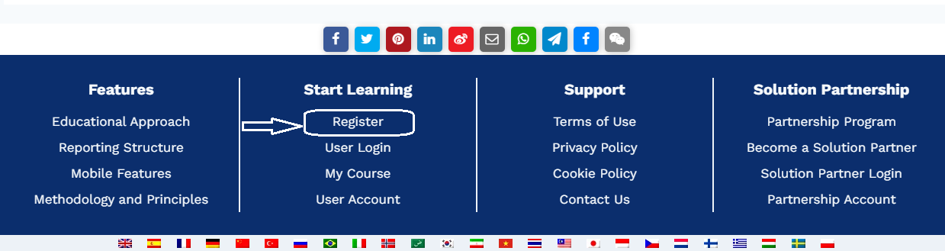
Visit onlinekidsacademy.org and tap the Register button in the bottom menu, as seen in the image below. You may also go directly to the enrollment page: https://onlinekidsacademy.org/en/enroll/
The following page will open:
📝 Step 2 — Open the Membership Form
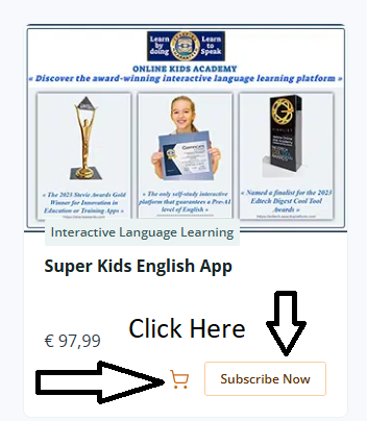
Click Subscribe Now to open the Membership Form.
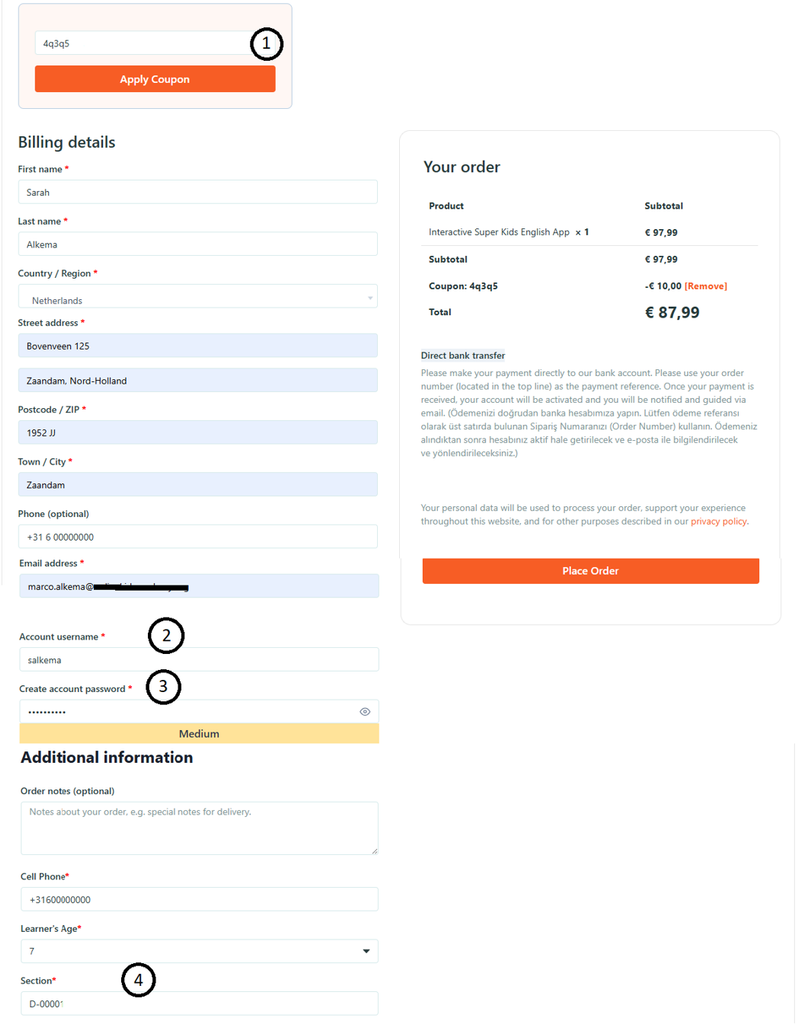
Please complete all fields carefully. Important notes:
🎟️ 1. Discount Code (Optional)
Before filling out the form, you may request a 10 Euro discount coupon from the Section Head who contacted you.
🔐 2–3. Create Your Username & Password
Choose a secure Username and Password. These will be required for future logins, so make sure to store them safely.
🆔 4. Enter Your Section ID
Your Section Head will provide a Section ID. This number is essential for tracking your activities and progress.
💳 Step 3 — Finalize Your Membership
Click Place Order to complete your registration.
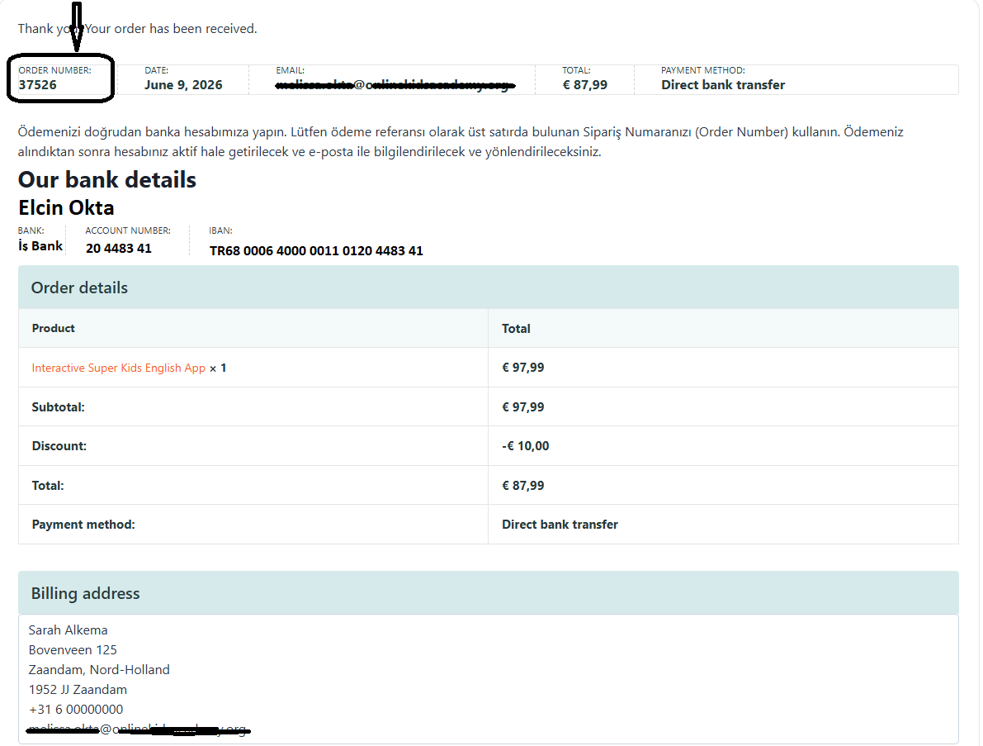
You will then see your Order Number, which must be included on your bank transfer or EFT receipt. The “Order Number” circled in the image below is very important for tracking your order.
If you are registering from Turkey, the membership fee will automatically appear in Turkish lira.
📬 Step 4 — Activate Your Account
Once your payment reaches us, your membership will be activated. You will receive an email containing:
- 📥 Your login instructions
- 🧩 Your assigned Section
- 📘 The link to the User Guide
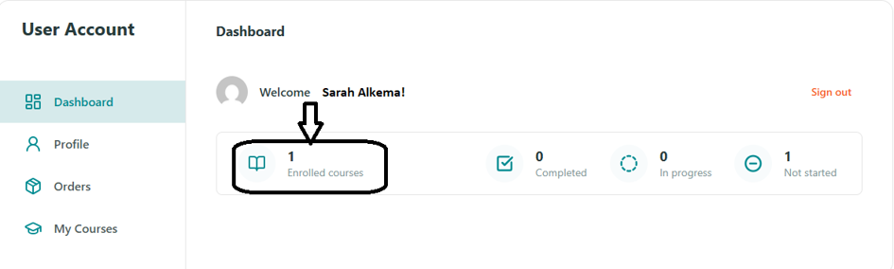
After activation, click User Account in the bottom menu to confirm that your profile has been added to the platform.

The image below confirms that your membership has been activated and that you have been added to the platform.
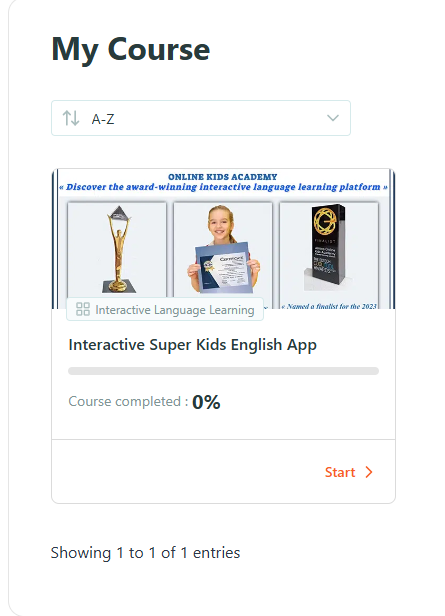
🚀 Start Learning
Go to My Courses

→ Click Start to access the Super Kids English App.
You may also access the Super Kids English App at https://platform4.onlinekidsacademy.org/
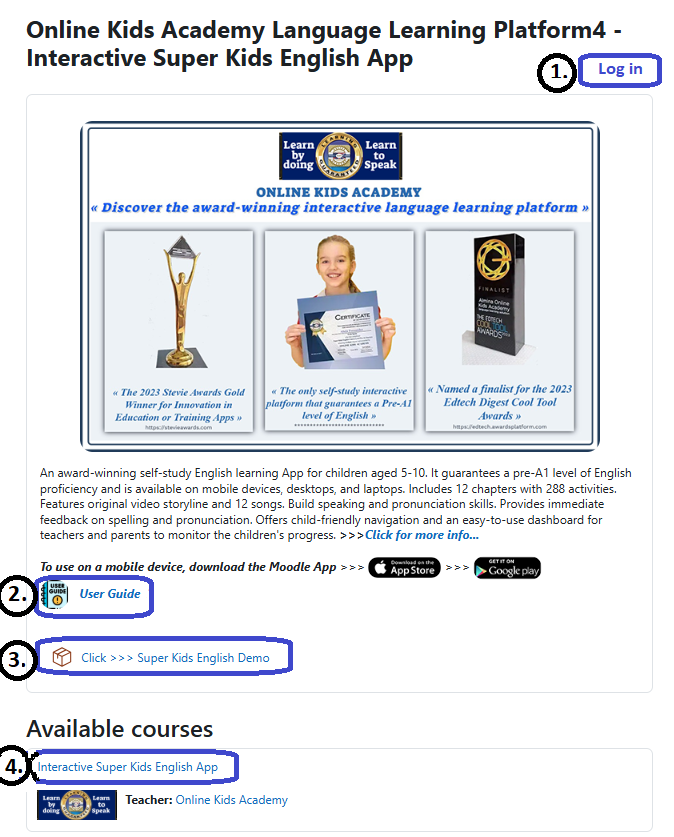
🔐 1. Log in to Your Account
Sign in using the username and password you created during registration. This will take you directly to your personal dashboard.
📘 2. Open the Detailed User Guide
Click “User Guide” to access the full guide. This resource clearly explains every feature of the App, helping both children and parents understand the learning environment.
🎬 3. Explore the Super Kids English Demo
To get familiar with the App’s structure and activity flow, you can also open the “Super Kids English Demo”. This demo gives you a quick preview of how children interact with the activities.
📚 4. Access the Interactive Super Kids English App
Select “Interactive Super Kids English App” to enter the learning area. Here, you can begin your journey with Chapter 1, where all activities are designed for independent learning.
🌟 We wish you success in your learning journey!
Thank you for choosing Online Kids Academy.
Our team is always here to support you whenever you need assistance.